Key Takeaways
- •The global virtual keyboards market was valued at $1.25 billion in 2024 and is growing at 6.9% annually
- •AI keyboards save professionals 40–50% typing time compared to traditional keyboards
- •Cross-platform sync lets your keyboard learn your style across every device you own
- •CleverType is the top pick for multi-device AI keyboard use — especially on Android
- •SwiftKey syncs via Microsoft account across Android, iOS, and Windows
- •Gboard leads on Android and Chrome OS but has limited desktop presence
- •True cross-device keyboards sync predictions, custom words, clipboard, and settings — not just the layout
Nonetheless, Most people don't think about their keyboard until something goes wrong. But if you switch between an Android phone, an iPad, and a Windows laptop in a single day — trust me, it matters. A lot. Moreover, What works on one platform often flat-out doesn't exist on another, and every time you pick up a different device, your learned typing habits are basically gone.
Hence, So what's actually out there if you want a universal AI keyboard — something that works everywhere and actually learns across all your devices? Therefore, Here's the true breakdown.
What Makes a Keyboard Truly Cross-Platform?
Here's the thing — a cross-platform keyboard isn't just one that happen to have an app on both Android and iOS. Real cross-device sync means the keyboard is actually learning from every device you use, not just whichever one you're holding right now.
Full cross-platform support looks like this in practice:
- •Synced custom dictionary: words you've added on Android show up on iOS too
- •Learned predictions: your typing patterns transfer between devices
- •Clipboard sync: copy on your phone, paste on your desktop
- •Settings sync: themes, layouts, language preferences all follow you
- •Account-based identity: your keyboard profile lives in the cloud, not on one device
Most keyboards only check one or two of those boxes. Nonetheless, Very few actually hit all five. The Wikipedia overview of mobile keyboard point out that on-device learning has been the standard for ages — and that's exactly what make cross-platform portability so difficult to pull off.
| Feature | CleverType | Gboard | SwiftKey |
|---|---|---|---|
| Android support | ✅ Full | ✅ Full | ✅ Full |
| iOS support | ✅ Full | ✅ Full | ✅ Full |
| Desktop/Windows | 🔜 Coming | ❌ Limited | ✅ Via Windows |
| Synced predictions | ✅ Yes | ⚠️ Partial | ✅ Yes |
| Clipboard sync | ✅ Yes | ⚠️ Android only | ✅ With Windows |
| Privacy-first | ✅ On-device AI | ❌ Data to Google | ⚠️ Data to Microsoft |
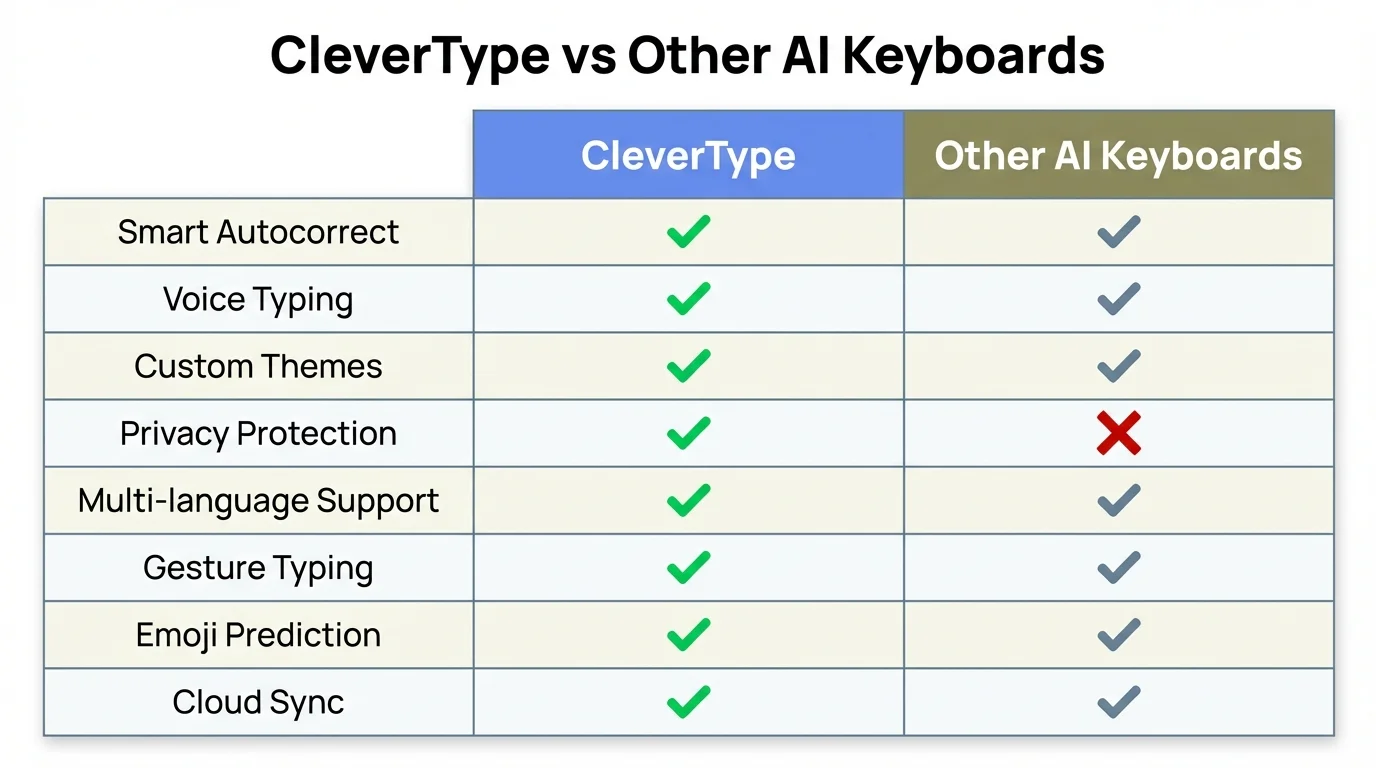
CleverType vs Other AI Keyboards: Feature comparison across privacy, cross-device sync, and AI capabilities
CleverType: The Best AI Keyboard for All Your Devices
Additionally, If you want a consistent AI keyboard across Android and iOS, CleverType is honestly the strongest option right now. Consequently, What I've noticed is that it doesn't feel like a regular keyboard that got AI features added later — the intelligence is baked into how the whole thing works from the start.
Nevertheless, What actually sets it aside? Nonetheless, A few things that matter when you're using it day-to-day:
On-device AI processing.
CleverType's prediction and grammar corrections run on your phone locally — your typing data never leaves the device. Gboard ships everything to Google's servers, which is fine if you're okay with that trade-off. Additionally, But for privacy-conscious users who care how AI keyboards protect their data, it's not a small thing.
Context-aware suggestions.
CleverType actually reads what you're typing and adjusts accordingly. Work email? It tightens thing up. Texting a acquaintance? It stay casual. Nonetheless, That kind of contextual awareness is surprisingly rare in multi-device keyboards, and once you've used it, going back feels weird.
100+ language support with multilingual predictions.
Nevertheless, If you switch between language mid-sentence — which bilingual users do all the time — CleverType just handles it. No manual switch needed. See how AI keyboards make multilingual typing effortless.
Smart clipboard management.
Copy something on one device, and CleverType keeps it accessible when you switch to another. Small feature. Genuinely useful when you're bounce between your phone and tablet all day.
Nevertheless, The voice-to-text with AI enhancement is also noticeably better than what most keyboards offer — it doesn't just transcribe, it cleans up the output. So you're not spending five minutes editing dictated text after the fact.
Download CleverType from the Play Store and your keyboard profile start building from day one — no complicated setup, no hoops to jump through.
Microsoft SwiftKey: Strong Cross-Platform Sync, With Caveats
SwiftKey has been the default recommendation for multi-device keyboard users for years. And honestly, Microsoft's AI integration has made it genuinely more capable. If you're already living inside the Microsoft ecosystem — Outlook, Teams, OneDrive — the Copilot integration actually makes practical sense.
Here's how the cross-device sync actually plays out with SwiftKey:
- Sign in with your Microsoft account on Android and iOS
- Your personalized dictionary and typing history sync to the cloud
- On Windows, clipboard sync works through the Windows 11 cloud clipboard feature
- Copilot Compose lets you adjust tone and length of messages from the keyboard
Consequently, But here's the grab. SwiftKey's sync has had real reliability issues. Community reports going back to 2023 and into 2025 showed users getting one-way syncs — settings would push from one device but just not pull to the other. Microsoft has worked on it, but it's not as smooth as the marketing makes it sound. Not even close-fitting.
Moreover, And the AI feature, while useful for Windows users, lock you into Microsoft's data ecosystem. According to TechCrunch's coverage of SwiftKey's AI update, the Bing Chat integration added in 2023 was a step forward — but it require a Microsoft account and data share-out that plenty of user aren't comfortable with.
What SwiftKey does well:
- •Multilingual typing (handles 300+ languages)
- •Calendar and task integration via Microsoft To-Do
- •Windows clipboard sync is genuinely smooth when it works
- •Copilot tone adjustment is solid for professional writing
What it doesn't do well:
- •Privacy — it's a Microsoft product and that means data collection
- •Sync reliability can be inconsistent
- •The iOS version feels slightly behind the Android version
Compared to CleverType's privacy-first approach, SwiftKey makes more sense if you're already deep in Microsoft's tools. If you're just looking for the best AI typing experience overall? Hence, It's not the top picking.
Gboard: Google's AI Keyboard and Its Limits Across Devices
Nonetheless, Gboard is probably sitting on your Android phone right now. It's the default on most devices, it works well, and Google's AI backing means prediction are truly good. Nonetheless, But calling it a cross-platform keyboard? That's a stretch, honestly. If you need a more capable Android option, the complete guide to the best AI keyboard apps for Android is worth a read.
Gboard's platform coverage in 2025:
- •Android: excellent, deep system integration
- •Chrome OS: strong, syncs with your Google account
- •iOS: available but limited — many features don't work the same way
- •Windows/Mac/Linux: no native app
The Gemini AI integrating that Google add in late 2024 is genuinely impressive on Android. Real-time context-awareness, visual context for photo-based conversations, near-perfect voice type with claim 98% accuracy — useful stuff. But none of that follows you to iOS. On iPhone, Gboard is stuck in a restricted sandpit. Whole unlike experience.
Therefore, And then there's the secrecy angle. Gboard processes a significant amount of typing data through Google's servers. Pew Research Center surveys on digital privacy consistently show that 79% of Americans are worried about how companies use their data — and Gboard's model is data-hungry by design. That's Additionally, just the reality of it.
Strictly Android user who's never touching an iPhone? Gboard is splendid. But for anyone switching between Android and iPhone, or wanting desktop coverage, it falls short — and CleverType picks up right where it leaves off.
iOS-Specific AI Keyboards: What Actually Works on iPhone and iPad
iOS has its own AI keyboard option deserving covering separately — because Apple's platform restrictions truly modify what's possible. Additionally, This isn't just marketing talk. Therefore, The limitation are real.
Apple's native keyboard has gotten better with every iOS release. iOS 18 brought prognostic text improvement and well autocorrect that Apple claims reduced wrong corrections by 17%. Not bad. Additionally, But Apple's own keyboard still doesn't offer the AI writing assistance you get from third-party apps.
Third-party keyboards on iOS hit a hard wall. No persistent background access, limited clipboard access unless you grant Full Access, no deep app integration. Hence, That's why Gboard on iOS feels noticeably worse than Gboard on Android — same app, totally different experience.
What actually works well on iOS for AI keyboards:
CleverType on iOS
CleverType's iOS version works within Apple's constraints but still delivers grammar fixing, tone adjustment, smart replies, and multilingual support. The grammar fix works in any text field — emails, messages, notes, everything. Nonetheless, For more options, check out the best AI keyboards for iOS that make typing smarter.
SwiftKey on iOS
Furthermore, It works. It syncs with Android via your Microsoft account. But the Copilot features are noticeably more limited than on Android. Consequently, You're get a trimmed-down edition.
Grammarly Keyboard
Furthermore, Solid for grammar. That's basically it though. It doesn't predict, doesn't learn your style, and doesn't offer AI replies. CleverType covers everything Grammarly Keyboard does — and then some.
The App Store's third-party keyboard category has grown a plenty — but the gap between the good ones and the mediocre one is huge. Most iPhone users have never gone beyond the default keyboard, which means they're leave a lot of time-saving features on the table.
How Cross-Device Keyboard Sync Actually Works (and What to Expect)
Keyboard sync sounds simple. In practice, there are a few different models — and they behave pretty differently depending on which keyboard you're using.
Account-based sync
Therefore, This is what most modern keyboards use. Log in with the same account on every device, and your data lives in the cloud. SwiftKey uses your Microsoft account. Hence, Gboard uses your Google account. CleverType has its own system.
On-device learning with optional cloud backup
This is the more privacy-friendly approach. Your patterns are learned locally, but can be backed up when you want. It's slower to sync to a new device, but you're not constantly sharing data to a server somewhere.
Real-time sync
This is what clipboard sharing needs to work — and it's the hardest to pull off across platforms because Android, iOS, and Windows all handle clipboard permission completely differently.
Nevertheless, According to Statista's keyboard market forecast, the keyboard software market sits at $4.98 billion globally in 2025. Hence, AI-enhanced keyboard are taking a growing share of that, which is why every major player is pouring money into cloud sync infrastructure right now.
Realistically, here's what to expect when you first set up a multi-device keyboard:
- Day 1: Basic sync works — your custom words and layout transfer
- Week 1: The AI starts learning your style on each device separately
- Month 1: If predictions truly sync, the keyboard starts feeling consistent across devices
- Ongoing: The more you type, the smarter it gets — but only if the cross-device learning is actually implemented
Additionally, CleverType syncs the things that actually matter — custom dictionary, settings, clipboard — and keeps the core AI processing on-device. Moreover, It's a pretty sensible middle ground between full cloud dependency and completely isolate on-device learnedness.
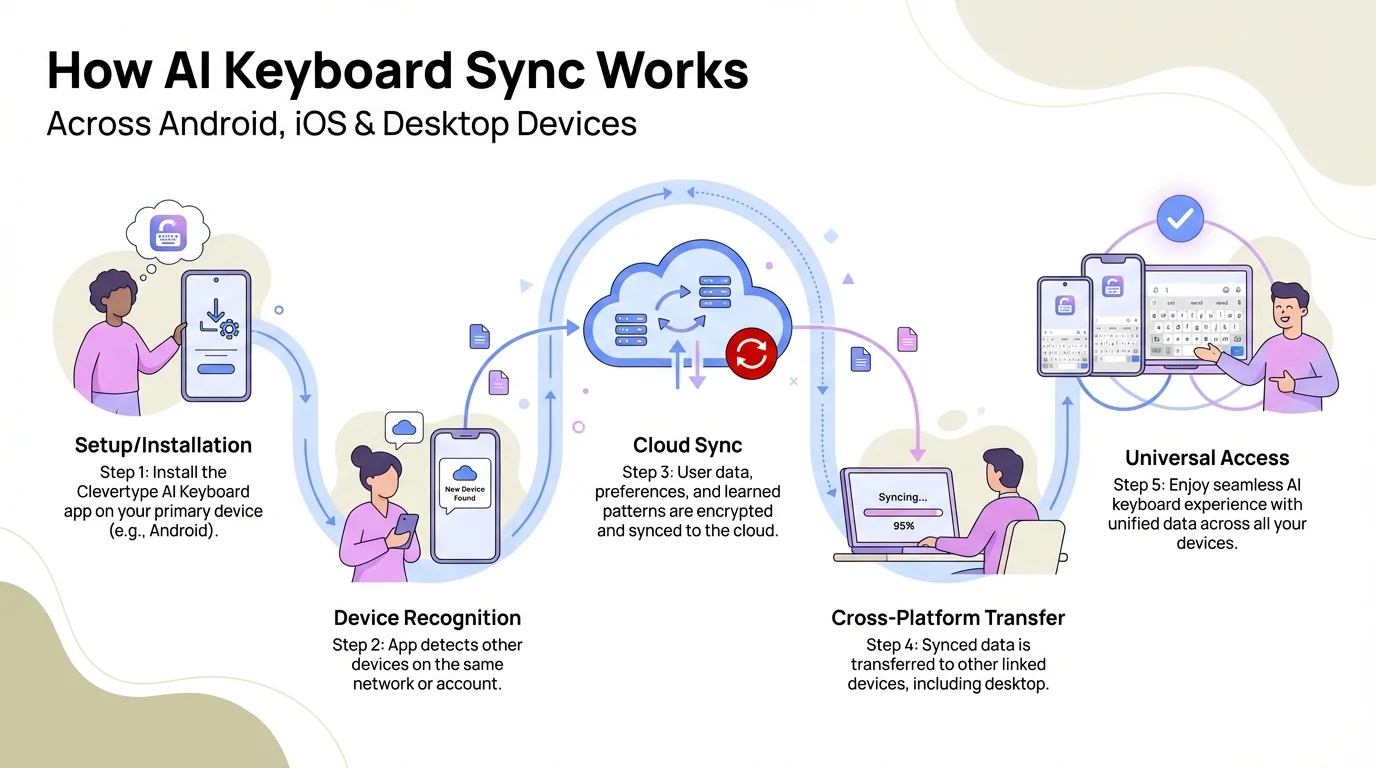
How cross-device AI keyboard sync works: from initial setup through cloud sync to seamless universal access across all your devices
Desktop AI Keyboard Options: The Weakest Link in Cross-Platform Typing
I'll be genuine with you — desktop support is where most mobile AI keyboard entirely fall apart. Moreover, Gboard has no Windows or Mac app. SwiftKey's desktop presence basically amounts to clipboard sync through Windows 11. Therefore, And most iOS-specific keyboards don't exist on desktop at all. It's kind of a messiness.
The desktop typing experience in 2025 is mostly covered by:
- •Built-in OS tools: Windows 11's AI-powered autocomplete, macOS's text replacement
- •Browser extensions: Grammarly's browser extension covers Chrome, Firefox, Edge, Safari
- •Standalone writing tools: tools like Notion AI, Google Docs Smart Compose
- •SwiftKey's Windows integration: clipboard sync, but not a full keyboard replacement
If you want your AI keyboard to follow you to your laptop, no single app does this perfectly yet. SwiftKey comes closest on the Windows side. Mac users? The gap is even bigger. Hence, Not ideal. But that's where thing stand.
Additionally, This is where CleverType's roadmap really matter. Desktop support is in development — which would make it the first truly universal AI keyboard across Android, iOS, and desktop. If you start on mobile now, your learned preferences will convey over once desktop arrives. Worth keeping in mind.
In the meantime, the practical multi-device setup most power user end up run looks something like this:
| Device | Best AI Keyboard Option |
|---|---|
| Android phone | CleverType |
| iPhone | CleverType |
| iPad | CleverType |
| Windows laptop | SwiftKey (clipboard) + Grammarly browser extension |
| Mac | macOS built-in + Grammarly browser extension |
| Chromebook | Gboard |
Nevertheless, Not perfect — not even close. But that's the realism right now.
Choosing the Right Multi-Device Keyboard: What Matters Most
The right multi device keyboard really comes down to what you need it to do. Here's a quick way to think about it:
You own Android and nothing else:
Gboard is solid and costless. Furthermore, CleverType is the better pick if you care about AI writing assistance, grammar correction, or keeping your data private.
You own both Android and iPhone:
Hence, CleverType. Works well on both platforms, and you don't need a Google or Microsoft account to make it work.
You're deep in the Microsoft ecosystem (Outlook, Teams, Windows):
Consequently, SwiftKey makes practical sense here, especially if clipboard sync between Android and Windows is what you need most.
You write in multiple languages:
Nonetheless, CleverType's 100+ language support with cross-language prediction is hard to beat. SwiftKey is a close second, but not quite there.
Privacy is your primary concern:
CleverType processes AI on-device and doesn't sell your typing data. Both Gboard and SwiftKey are cloud-heavy by comparison. That's just the trade-off.
You want grammar and tone correction across all apps:
Additionally, CleverType handles this in every text field. Furthermore, Grammarly Keyboard does it too — but it doesn't predict, doesn't learn your style, and has no AI replies. You finish up with a narrow tool.
Therefore, According to research from Pew Research Center on smartphone usage, 85% of Americans own a smartphone — and a growing percentage own multiple devices. The multi-device keyboard space is going to get a lot more competitive. The keyboards that sync well and actually protect user data are the one that will win.
Nevertheless, Look, if cross-device sync is what you want, start with a keyboard that was built for it from day one — not one where sync got added as an afterthought.
Frequently Asked Questions
What is the best cross-platform AI keyboard in 2025?
CleverType is the top pick for cross-platform use across Android and iOS — AI-powered predictions, grammar correction, 100+ language support, and on-device processing that keeps your data private. Consequently, SwiftKey is the better call if you specifically need Windows desktop sync on top of that. For a detailed side-by-side, see our CleverType vs Gboard vs SwiftKey comparison.
Can I sync keyboard settings across Android and iPhone?
Consequently, Yes, but only with keyboard that utilize account-based sync. Nevertheless, CleverType and SwiftKey both sync custom dictionaries, preferences, and settings across Android and iOS when you're signed in with the same account. The key is signing in — that's what makes the sync happen.
Does Gboard work the same on Android and iOS?
Moreover, Nope. Gboard on iOS is noticeably more limited than on Android because Apple's platform restriction block full system access. Features like deep app integration and real-time Gemini AI are Android-only. It's the same app in name only, really.
Is there an AI keyboard that works on desktop too?
SwiftKey syncs clipboard between Android and Windows 11, which is something. But no mobile AI keyboard currently offer a full desktop replacing. Hence, CleverType has desktop support in developing. For now, most desktop user combine a mobile AI keyboard with a browser extension like Grammarly to cover the gaps.
Are cross-platform keyboards safe to use from a privacy standpoint?
Depends entirely on which keyboard. Additionally, Gboard sends data to Google. SwiftKey sends it to Microsoft. CleverType runs AI on-device, so your typing data stays on your device and isn't used to train anyone's models. That's a meaningful difference if secrecy matter to you.
What does AI keyboard sync across devices actually include?
Full sync mean: custom dictionary words, learn predictions, clipboard contents, theme and layout preferences, and language settings. Hence, Most keyboards sync some of these — very few hit all of them. That gap is worth paying attention to.
How much time can an AI keyboard actually save?
More than you'd expect. Nonetheless, Studies on AI-assisted typing show professional save 40–50% of typing time compared to standard keyboard. Smart predictive text alone can save up to 30 minutes a day for heavy mobile typists.
Ready to Type Smarter?
Upgrade your typing with CleverType AI Keyboard. Fix grammar immediately, change your tone, obtain smart AI replies, and type confidently while keeping your secrecy.
Download CleverType FreeAvailable on Android • 100+ Languages • Privacy-First
Share this article:
Sources
- Microsoft SwiftKey Wikipedia overview
- Virtual Keyboards Market Report 2024 — Cognitive Market Research
- Statista: Keyboards Market Worldwide
- TechCrunch: SwiftKey gains AI-powered features
- Pew Research Center: Americans and Privacy
- Pew Research Center: Mobile Technology and Home Broadband 2021
- Wikipedia: Virtual Keyboard